Montage
─ Windows productivity software
Montage
─ Windows productivity software|
Montage
─ Windows productivity software |
|
|
IdeaXchg | Montage | Intro | Products | Buy | Download | Help | Contact | Contents |
|
|
|||||
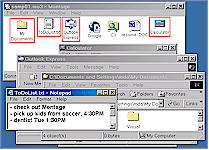
Montage helps you work fasterLaunch and arrange multiple application windows in one step, or close a group of programs with a single click, automatically saving and restoring window layouts. The sample screen on the right shows the result of opening a simple montage, such as one might use on a daily basis, which launches an Explorer window, Outlook Express (for email), a to-do list in Notepad, and the Windows Calculator. |
|
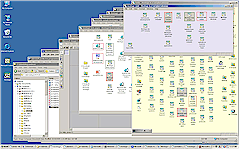
Montage gives you elbow roomReduce screen clutter and make it easier to work with multiple windows, even when display space is severely limited. Montage provides the kind of screen organizing capabilities you need to enjoy the benefits of a "paperless office". The screen shot shows a dozen neatly arranged windows, all opened as a result of opening a single main montage. In this case, one of the applications launched by the main montage was another instance of Montage, which in turn opened yet another montage. |
|
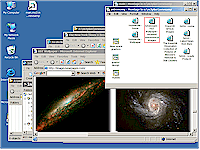
Montage manages activities, not just static informationOrganize and integrate not just information, but how you use it, so you can switch instantly from one activity to another, regardless of how many projects you have or how recently you've worked on them. This screen is one of a sample series that starts with a typical main montage, then opening a montage on the general subject of astronomy (the screen shot shown at right), and from there going to a montage of Hubble deep space graphics, finally ending with a graphic design montage, used to work on an idea for creating a logo design. |
|
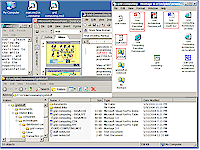
Montage makes your information and workplace portableTake your office with you, whether you're giving presentations on the road, shuttling between home and office, or moving to a new machine. Montage's portability features help you manage storage and backups, or publish and deliver your knowledge to others in a more useful, flexible form than any conventional document. This screen illustrates how a PowerPoint presentation might be enhanced by packaging it, along with related documents and references, into a portable montage. |
|